
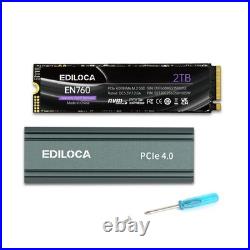

Blazing PCIe Gen 4.0 Speed By leveraging PCIe 4.0 x4 and NVMe 1.4 technology, it delivers sequential read speeds of up to 5000 MB/s. That’s approximately 1.6 times faster than PCIe 3.0 SSDs and a whopping 9.3 times faster than SATA SSDs, greatly reducing game and application load times. Enhanced Gaming Console Compatibility (PS5 – Ready) It comes with a tool – free, removable aluminum alloy heatsink designed specifically for efficient thermal management. This ensures the drive can sustain high performance close to peak speeds even during heavy loads and guarantees full compatibility with the PlayStation 5’s requirements. Premium Quality & Reliability Constructed using carefully selected, factory – original 3D NAND flash memory (either TLC or QLC depending on the capacity), the components are rigorously tested with specialized equipment. This ensures enhanced data transfer stability and an extended product lifespan. Optimized Cooling Solution The integrated aluminum die – cast heatsink effectively dissipates heat, enabling the drive to maintain performance near its maximum rated speed even under sustained high workloads. High – Capacity Options & Endurance It offers large storage capacities of up to 4TB, suitable for extensive game libraries and demanding content. With substantial endurance ratings, it provides peace of mind for long – term, intensive use. NVMe PCIe Gen 4×4. 500GB / 1TB / 2TB / 4TB. 80mm(L)x24.3mm(W)x9.4mm(H). PS5, Desktop, Laptop, Mac, PC, Memory Vault. ? What’s Included. PCIE 4.0 SSD. Q: Why can’t the SSD be recognized after installation? A: When using an SSD for the first time, it needs to be formatted and partitioned first. You can use “Disk Management Tool” to format and partition the SSD, and then use it in “Windows Explorer”. Q: Does the product include mounting accessories? Q: Where should we send SSD to repair? A: Ediloca adheres to the principle of professional quality and honest service and provides first-class products and services for our customers. If you have any questions or problems with the products, please notify us in time, and we will give you a satisfactory answer. Q: Why the capacity displayed from the PC is smaller than the original capacity? A: Actual usable space may be less than the total storage capacity listed due to Deci mal measurement used to represent usable capacity of the SSD. Actual capacity calculation: Total storage x 0.93. Factory default setting :1GB=1000MB=1000000KB=1000000000B. Computer system setting:1GB=1024MB=1048576KB=1073741824B. Example: 360GB SSD:Factory capacity: 360x1000x1000x1000=360000000000B. Transfer to PC displayed actual capacity: 360000000000B/1024/1024/1024=335G. Fast calculation: 360Gx0.93=335G. Free return for any quality issues.