
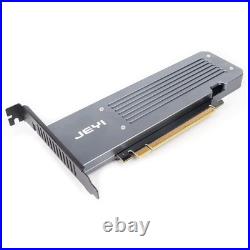

Only support Bifurcation Motherboard, support high and low profile bracket cabinet This adapter card uses 3.3V and 12V dual voltage power supply, 12V to 3.3V using dual 6A power modules to meet the power requirements of large power consumption SSD. Supports 4 X 2280 NVMe M. 2 up to 256 Gbps in one card by utilizing PCIe 4. 0 bandwidth NVMe RAID is supported base on the motherboard chipsets. Points to note before purchasing. 1, please be sure that your motherboard PCIe x16 slot support PCIe Bifurcation – signal split into four PCIe x4, general ordinary motherboard if the BIOS inside the “PCIEX16 Bifurcation” and other similar options, options to go in after seeing “PCIE 4×4″ and other similar settings generally support Bifurcation; server motherboard chips are not the same, please consult your motherboard official for details. If the PCIe slot can not be Bifurcation or BIOS is not set to x4x4x4 x4, only one hard drive can be recognized. If the motherboard can only be set to x8 x4 x4 can only recognize 3 disks. 2, if you want to group raid, please be sure to use four specifications of the same model of the same hard drive, so as to ensure consistency of hard drive performance. Can group raid is your motherboard decision. 4, some motherboards PCIe slot is bandwidth sharing, such as the first PCIe slot is PCIe x16, the second PCIe slot is PCIe x8, if the two PCIe slots are inserted at the same time on the device, because of bandwidth sharing reasons two PCIe slot is running PCIe x8 bandwidth. Assuming the second PCIe slot is not inserted into the device before the first PCIe x16 slot supports splitting into PCIe 4×4, but after the second PCIe slot is inserted into the device because the bandwidth is changed to PCIe x8, it will lead to splitting failure and not recognize the disk. There is also motherboards PCIe slot and U. 2 is only one of two choices, please pay attention to read the motherboard manual. 5, please note that most motherboards must work with the CPU to work, low-end CPU does not support Bifurcation, because the number of PCIe channels is not enough. 2 X16 PCIe 4.0 X4 Expansion Bifurcation Card. With an aluminum case to better protect your hard drive and increase heat dissipation. Supports 4 2TB hard drives running. Aslo can be used for 1,2,3 hard drives individually. The following motherboards have been verified to support PCIe Bifurcationting. GIGABYTE: X299X AORUS MASTER LGA 2066X, X299 AORUS, X299X DESIGNARE 10G, X299 UD4 PRO, X570 GAMING X, X570 AORUS ELITE, X570I AORUS PRO B450M AORUS ELITE, EVGA X299 FTW-K (need to update the BIOS to the latest version), EVGA X299 DARK (need to update the BIOS to the latest version).