
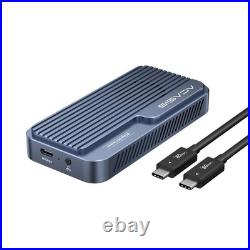


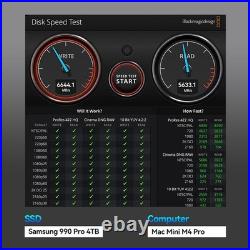
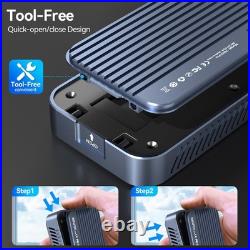

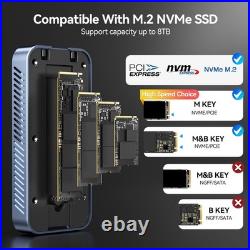

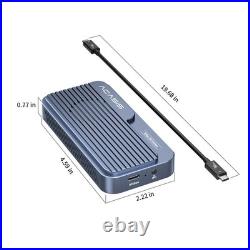
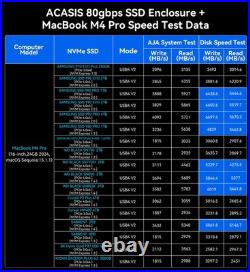
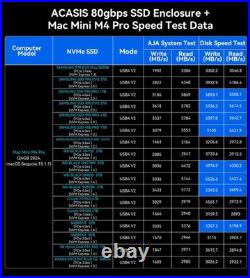
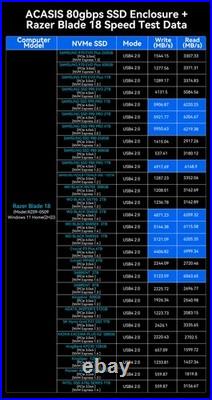

More users are seeking to use high-performance PCIe Gen5 NVMe SSDs like Samsung 9100 Pro in TB501Pro to maximize SSD performance. To meet user demands, we partnered with Intel for in-depth collaboration. After months of R&D and testing, we successfully completed the TB501Pro core chipset upgrade. TB501Pro (PCIe Gen5 SSD Compatible)was officially released on August 20, 2025. New PCBA Design: Latest Intel JHL9480(B2) chipset solution with comprehensive bottom-layer architecture optimization PCIe Gen5 Support: Native PCIe Gen5 NVMe SSD support, backward compatible with Gen4/Gen3 NVMe SSD Enhanced Compatibility: Significantly improved USB4 interface compatibility Optimized Transfer Performance: Improved connection stability, rigorously tested. Important Note : SSDs with integrated Heatsinks exceed our enclosure’s internal dimensions and are not recommended for installation. Confirm Thunderbolt 5/4/3/USB4 Port Availability Make sure your computer has a Thunderbolt 5 or USB4 port. All Apple computers released in 2015 or later with Thunderbolt 5 or USB4 ports are compatible. For Windows computers, those released after 2016 with Thunderbolt 5 or USB4 ports will also work. Choosing an SSD We have tested dozens of SSDs to ensure that our customers can find the right one for their needs. We recommend the Samsung 990 Pro/980 Pro, Western Digital SN850/SN850X, and Crucial P3 Plus. Formatting the SSD When using the SSD on macOS, you can choose either Mac OS Extended (Journaled) or APFS (whichever is faster for your needs). For Windows, select NTFS. If you want to use it on both systems, choose ExFAT (make sure to format it as ExFAT on macOS). Data Backup Please back up your data before using the SSD enclosure. We appreciate your understanding regarding this matter.